
Information architecture for Leagues/Teams/Athlete profiles
This project focuses on the design of “entity collections”, an evolution of FloSport’s former collections templates for the foundation of a new navigation system. At the end of this project, you’ll find an interactive prototype summarizing the global collections presented.
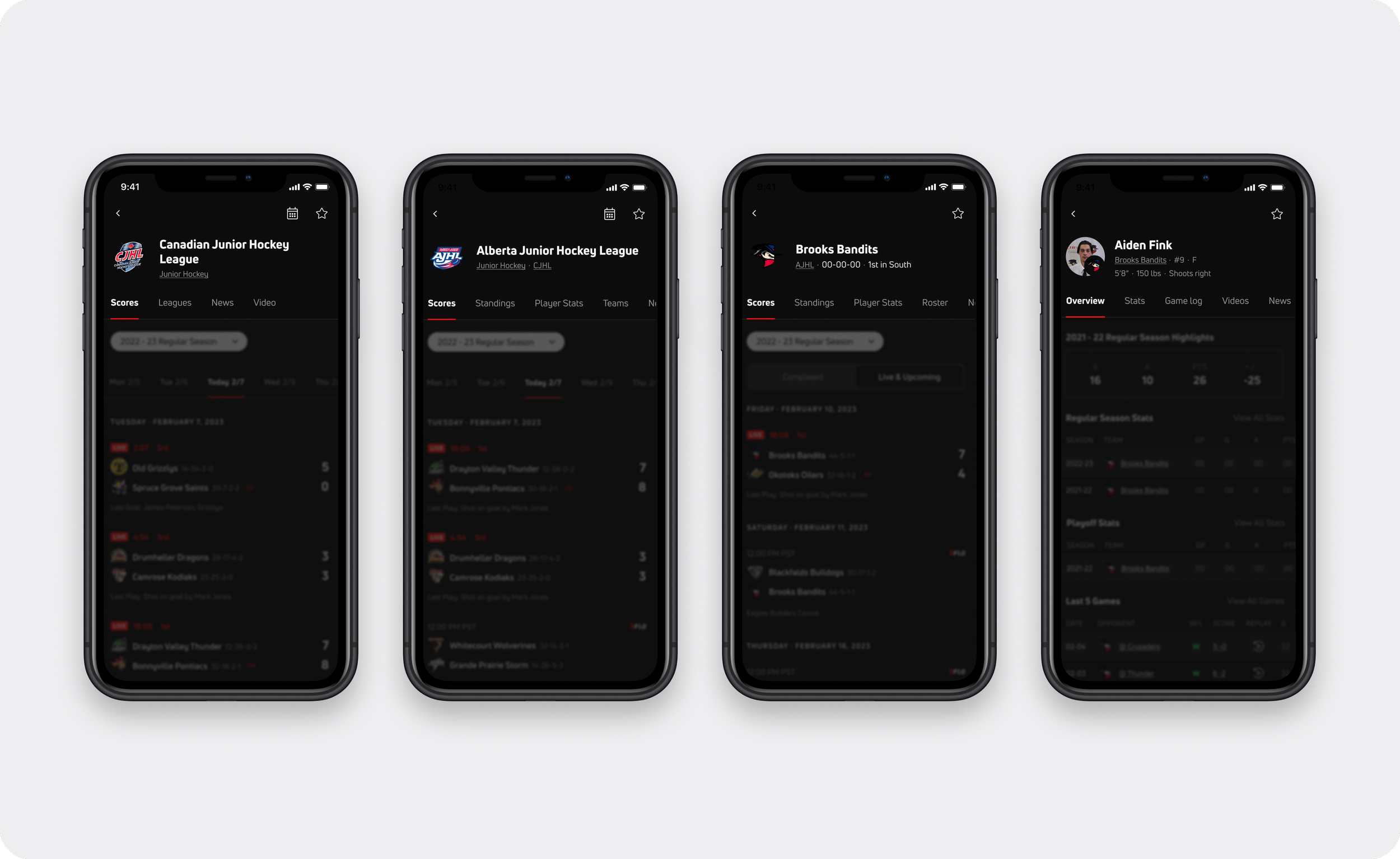
parent league — league — team — athlete
background
In 2022, FloSports acquired the major hockey live-streaming company HockeyTech. This company houses most of the hockey industry’s data outside of the NHL, not only providing users with live-steamed events, but with real-time stats and scoring data though the LeagueStat product. Ownership of this proprietary data and live scoring service was the primary reason behind the acquisition, paving the way of FloSport’s product convergence of HockeyTech into hockey fans’ essential destination — FloHockey.
My role involved designing the cross-platform responsive web, iOS, Android app experience for these foundation templates. This project was a collaborative effort across the design team.
goals
Our goal for 2023 was to migrate all HockeyTech users, data and content to FloHockey by the start of the year’s Hockey season. A major component of this transition required developing the information architecture, and page templates to support League, Team and Athlete pages on FloHockey.
Scalability of these pages across multiple FloSports verticals (sport products) was one of our key objectives, specifically focusing on team-based sports. Our goal was to establish these foundational templates with hockey as the backbone for future work.
context
Within many sports, there exists a hierarchy of leagues, teams, and athletes, a parent, child, and grandchild relationship, respectively. For this project, we refer to them as individual entities, with their own navigational breakdown, as further described.
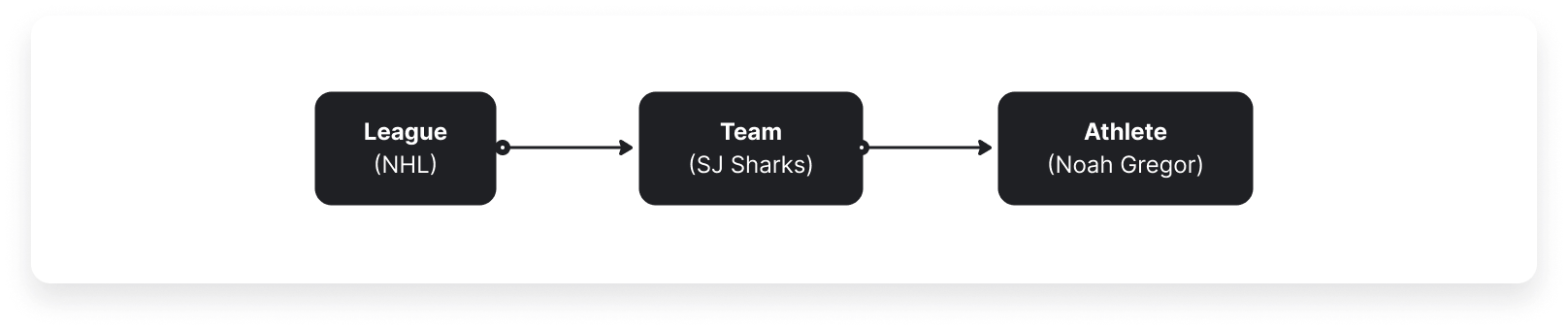
Using hockey as the example, the top level governing body begins at the league level (NHL, for example). With certain professional leagues, there may exist further levels of segmentation, usually at a regional level such as with conferences (western and eastern) and further branching down into divisions (pacific, central, atlantic, or metropolitan).
Teams live within these divisions, the secondary level in the hierarchy of these pages. And within teams, individual players exist, the tertiary level. While an athlete exists at the bottom of this hierarchy - they’re actually a top level entity within a sport, as an athlete may span across many leagues and teams over the course of their career.
This is the structure to keep in mind as I discuss the pages below. The goal is to create consistency among these pages with seamless transition when the user navigates within this system. As mentioned previously, with slight modifications to content, this hierarchy serves other sports such as racing, powering pages such as series, and tracks.
These entity collections also feature their own sub navigation, authentic to their respective sport, and are designed to support additional governing bodies (such as ‘parent’ leagues).
page breakdown
Each of these pages (league/team/athlete) contains several common structural components:
top level header with corresponding metadata (league, team, athlete name, logos and other metadata)
tabbed navigation providing access to the content that is relevant to the hierarchical level
relevant features/components within each tab of the navigation
entity IA
Below is a closer look at entity collection global and sub-navigation items for leagues, teams, and athlete profiles:
league collection pages
League pages serve as the introductory landing page for various editorial content and data, providing a gateway to further exploration and immersion within the sport. An example of this is the AHL (American Hockey league), or a KS (college), that would house respective teams.
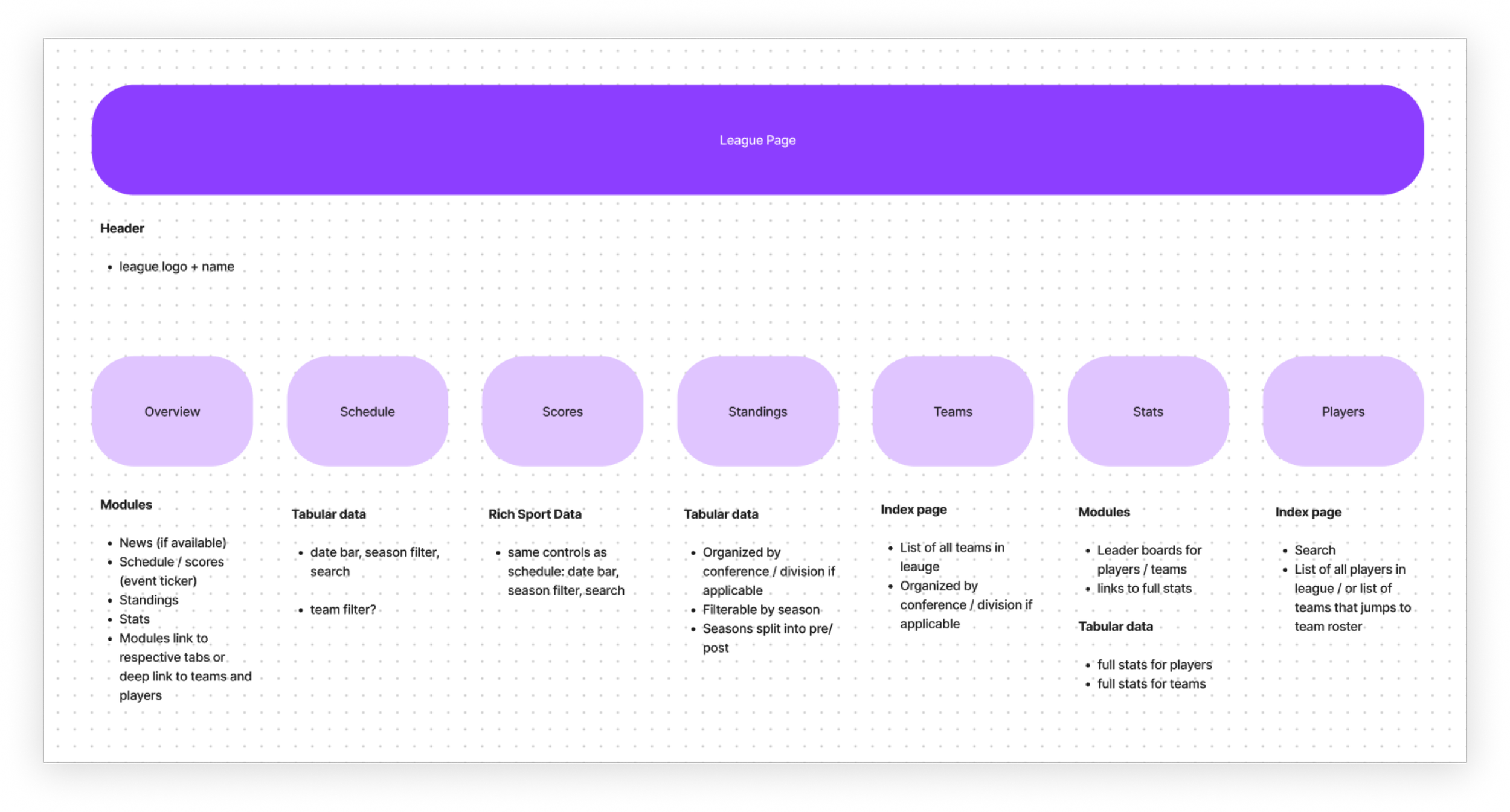
Each page includes a top-level header denoting the league name and logo with the following secondary tab navigation:
Overview tab – showcases the latest and greatest content within the league, focusing on both editorial and data. This includes featured news, headlines, standings, player stats, etc. These governing pages contain widgets and condensed tabular data components linking to the full table views. Depending on the editorial coverage we use either a 2-column or 3-column grid system. This depends on the available editorial content for that specific league – if a league doesn’t have editorial coverage we display a more minimal 2-column grid to prevent displaying empty pages.
Schedule tab — table component with date selectors, year/season filters, and search functionality.
Scores tab — results table component with date selectors, year/season filters, and search functionality, similar to the schedule tab.
Standings tab — table component with high data density. Filtering by conference/division (if applicable), as well as year/seasons filters.
Teams tab — index page listing all the teams within the league. Filtering by conference/division (if applicable).
Stats tab — tabular data for players and teams within the league, leader boards for players/teams. Filtering by year/season, possible team filter.
Players tab — index page of all players within the league. Search functionality and possible team filter to change selected team.
team collection pages
Team pages exist as a child collection page to the league pages, serving to provide the user with all relevant data and content pertaining to that specific team.
These pages are similarly structured with a secondary tab navigation, initially routing the user to an overview page, from where users dive deep into team-specific content.
Layout
Like league pages, we can use a 2-column or 3-column grid system dependent on the available editorial content for that specific team – if a team doesn’t have editorial coverage we display a minimal 2-column grid.
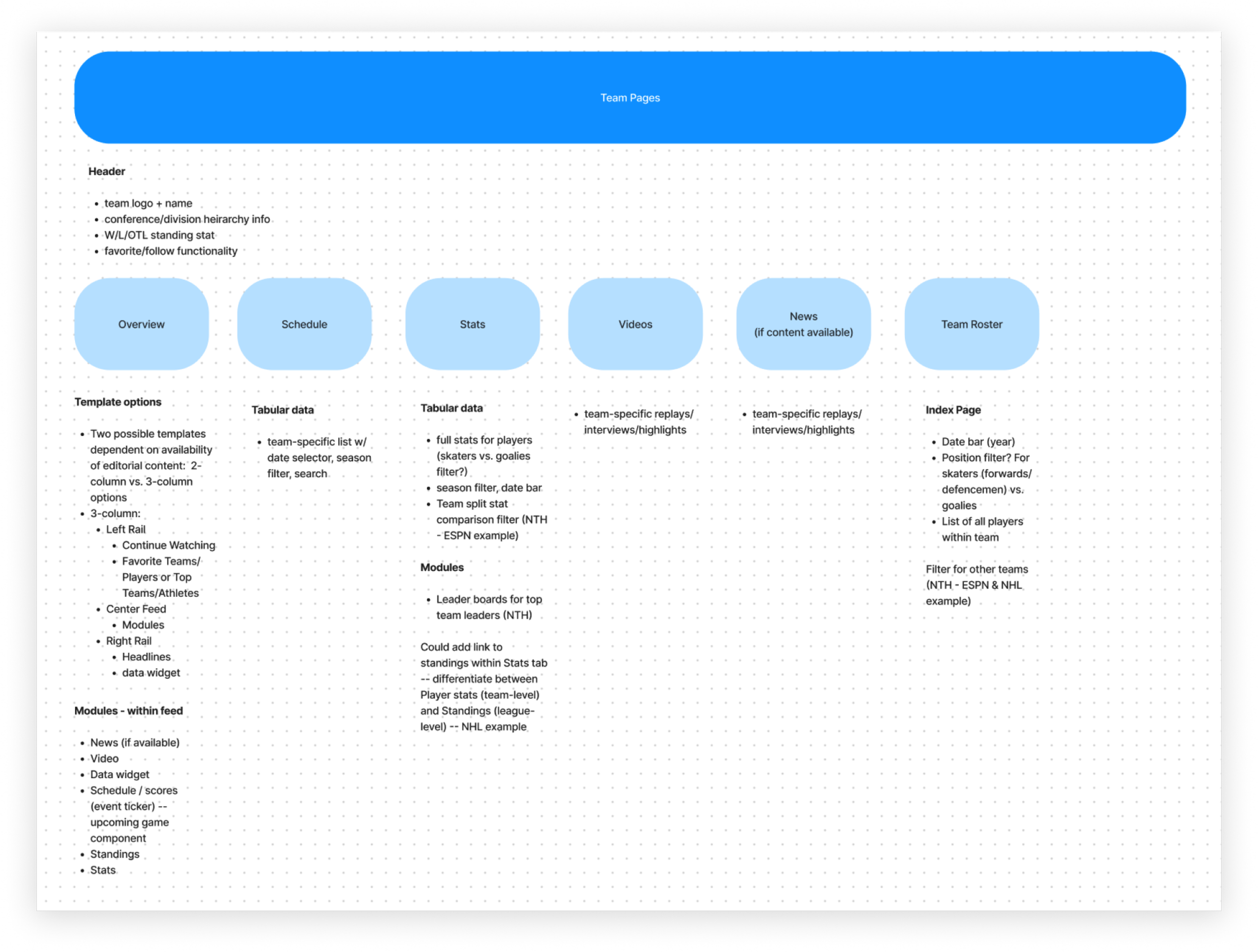
Each page begins with a top-level header denoting the team name and logo with additional metadata below:
governing conference/division
recent standing stat (W/L/OTL)
follow/favoriting functionality
Navigation
Below the team header, there are the following secondary tab items:
Overview – showcases team-specific editorial, scoring, and data content. This includes featured news, headlines, standings, player stats. This page also contains information about live/upcoming team games, and greater emphasis on scheduled events.
Scores tab – We initially didn’t design with this tab for the teams page — it was only considered for the league entity collection due to MVP constraints. After discussion with stakeholders, it was clear that the scores tab is an essential part of the fan experience. It was not only included in further designs, but prioritized as the primary navigation item.
Schedule tab — team-specific table component with date selectors, year/season filters, and search functionality.
Stats tab — team-specific tabular data for players Filtering by year/season, possible team filter.
Videos tab — team-specific replays, interview, or highlights
News tab — team-specific news articles (if editorial content is available)
Team Roster tab— index page of all players within the team with year/season filters, player positions filters differentiating skaters (forwards/defense) and goalies.
Athlete Profiles
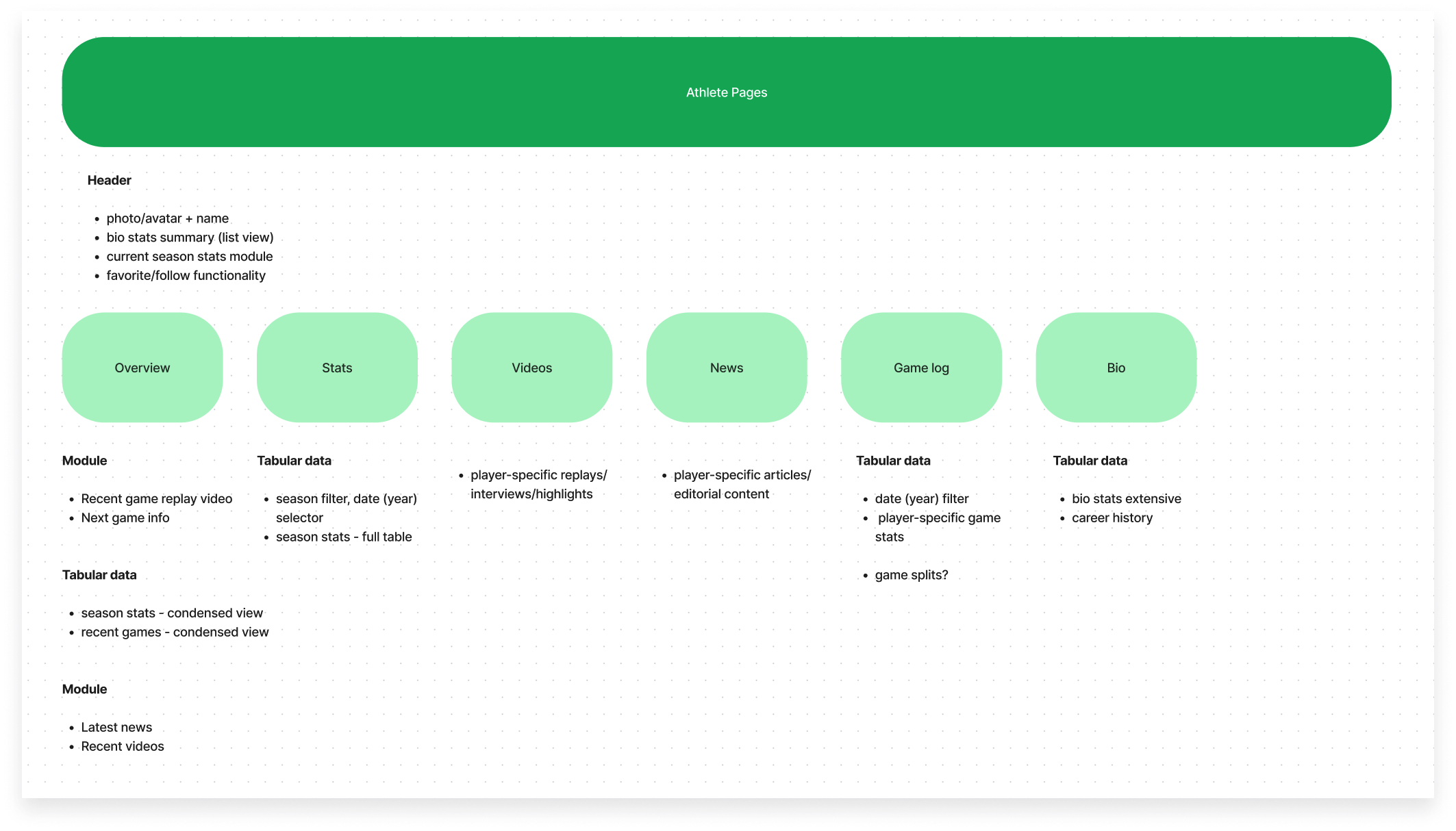
Athlete pages are the tertiary item item within this structure, displaying all relevant data for an individual player’s stats. These pages reside within the associated player’s team, with a very similar tab structure.
Navigation
Each page displays a top-level header denoting the athlete’s name and avatar/photo with additional metadata below:
bio stats summary (quick list view)
current season stats module
follow/favoriting functionality
Below the athlete header, there is a similar secondary tab navigation:
Overview tab – presents an introduction into the player’s data and media summary. This includes summary stat tables, recent games played, upcoming games, videos, and athlete or team-specific news
Stats tab - filterable sport-speciic tabular data. Filtering by year/season
Game log - tabular data of game stats and history. Filtering by year/season
Videos tab - replays, interview, or highlights
News tab - editorial content
Bio tab - extensive bio stats and career history
before & after
Visual comparison (web)
The new entity collections were designed with distinct headers pinned directly below the global navigation, existing outside of the original page wrapper. Their content is separated from the page body, without interruption from an ad unit to clearly communicate the hierarchy.
Within this new collection header is the tabular sub-navigation pertaining to the collection type.
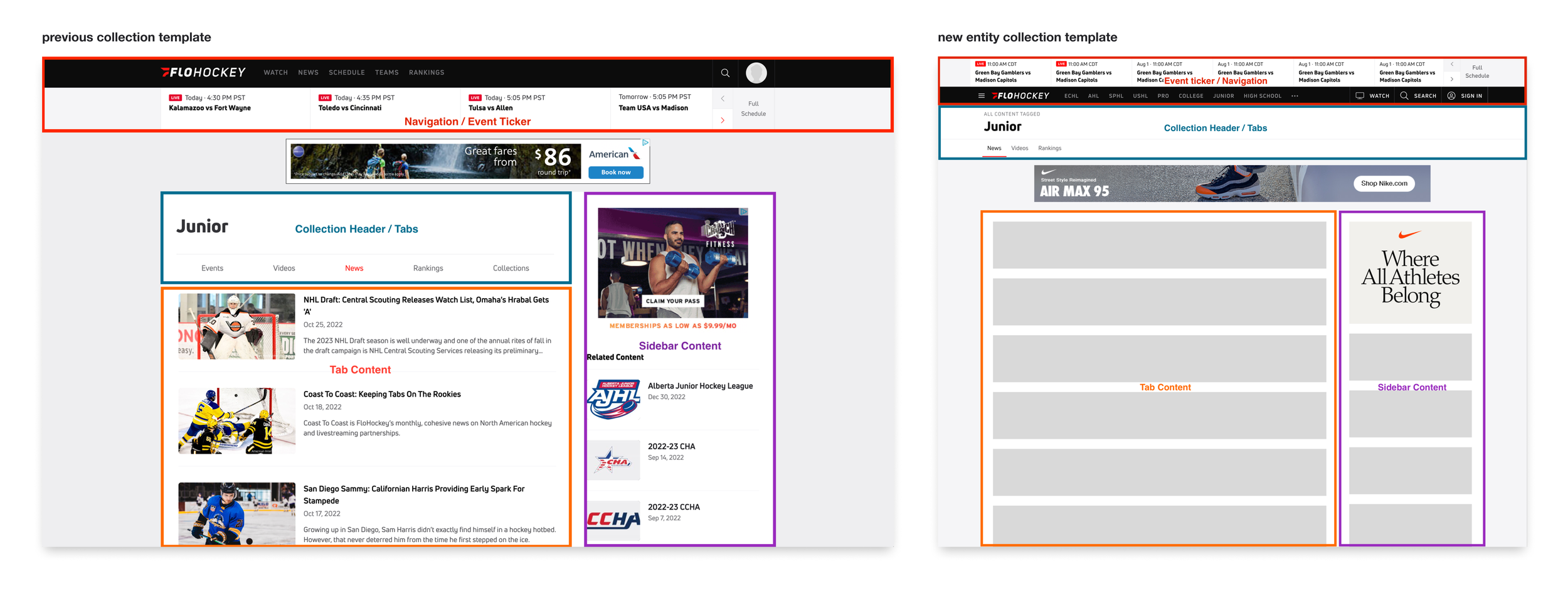
previous collections (left) vs. redesigned collections (right)
scaleable templates
These entity collections templates were designed with scaleability in mind. Regardless of the entity collection type (parent league, league, team, other governing body, etc.), the layout has a repeatable pattern with consistent page elements.
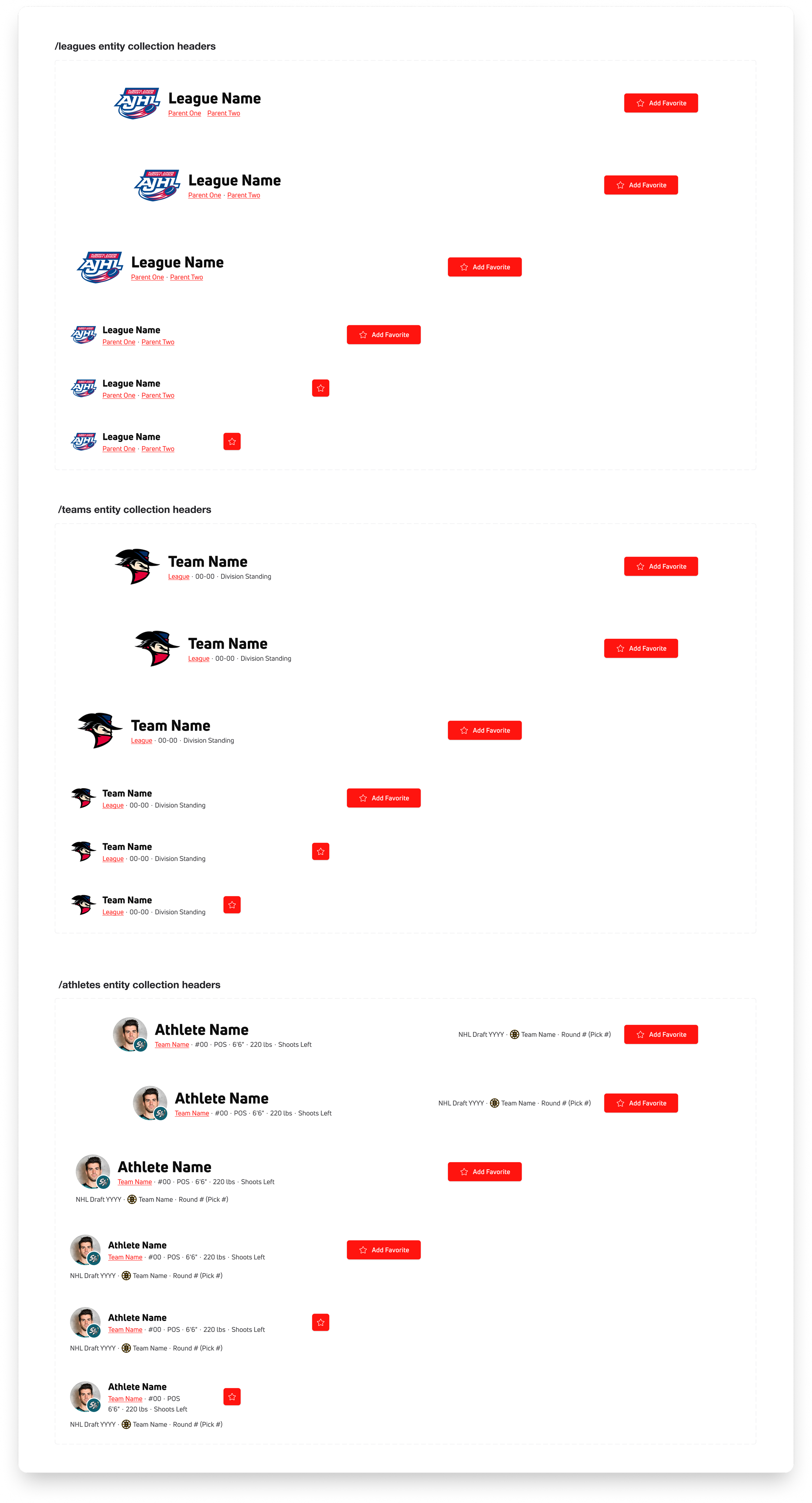
Each template contains the entity name, logo, favoriting CTA, breadcrumb (if applicable), and sub-navigation within its header. The page content then follows, and is display is dependent on the responsive breakpoint.
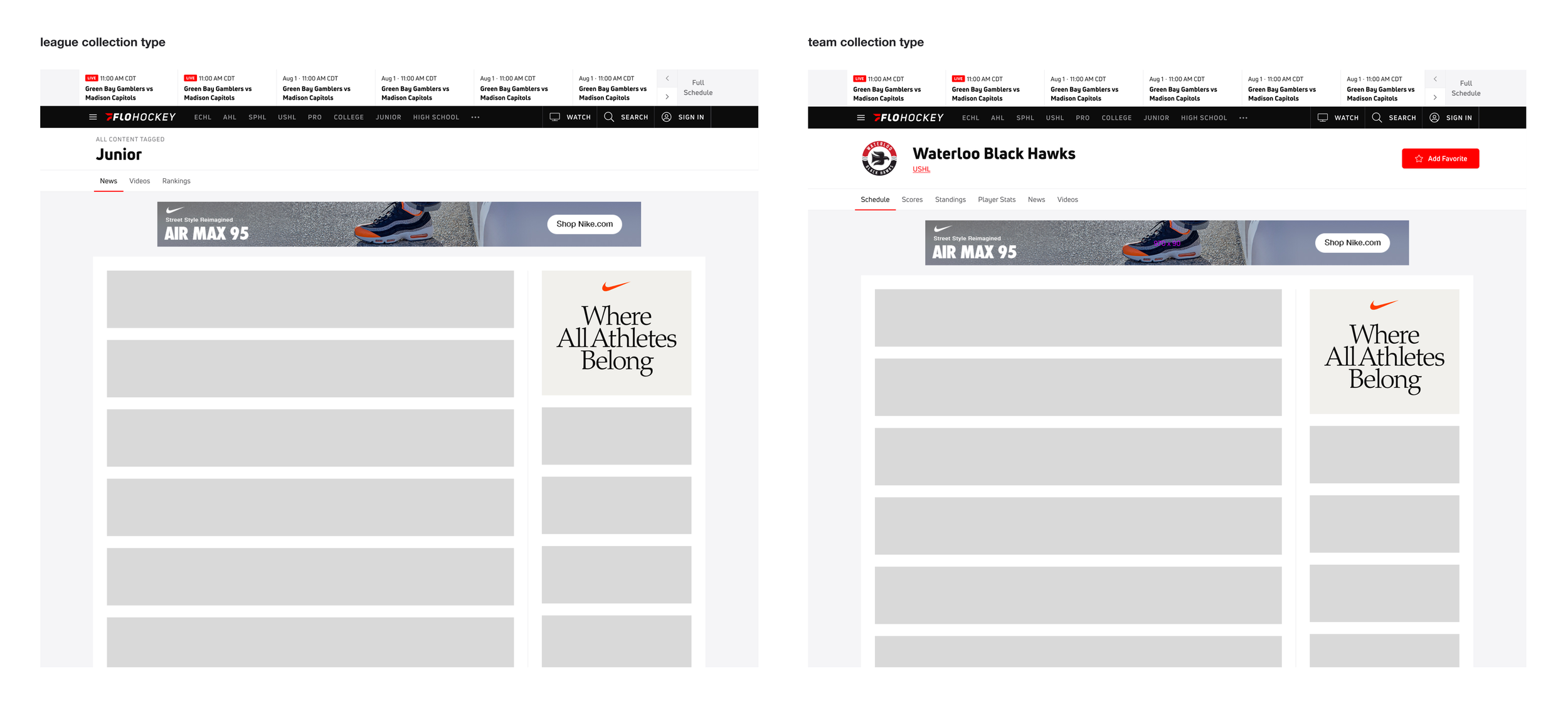
example of scaleable template model with league collection (left) and team collection (right)
native overview
Native apps use a consistent template for entity collections, optimized for the mobile viewport, following iOS/Android design interaction/navigation guidelines.
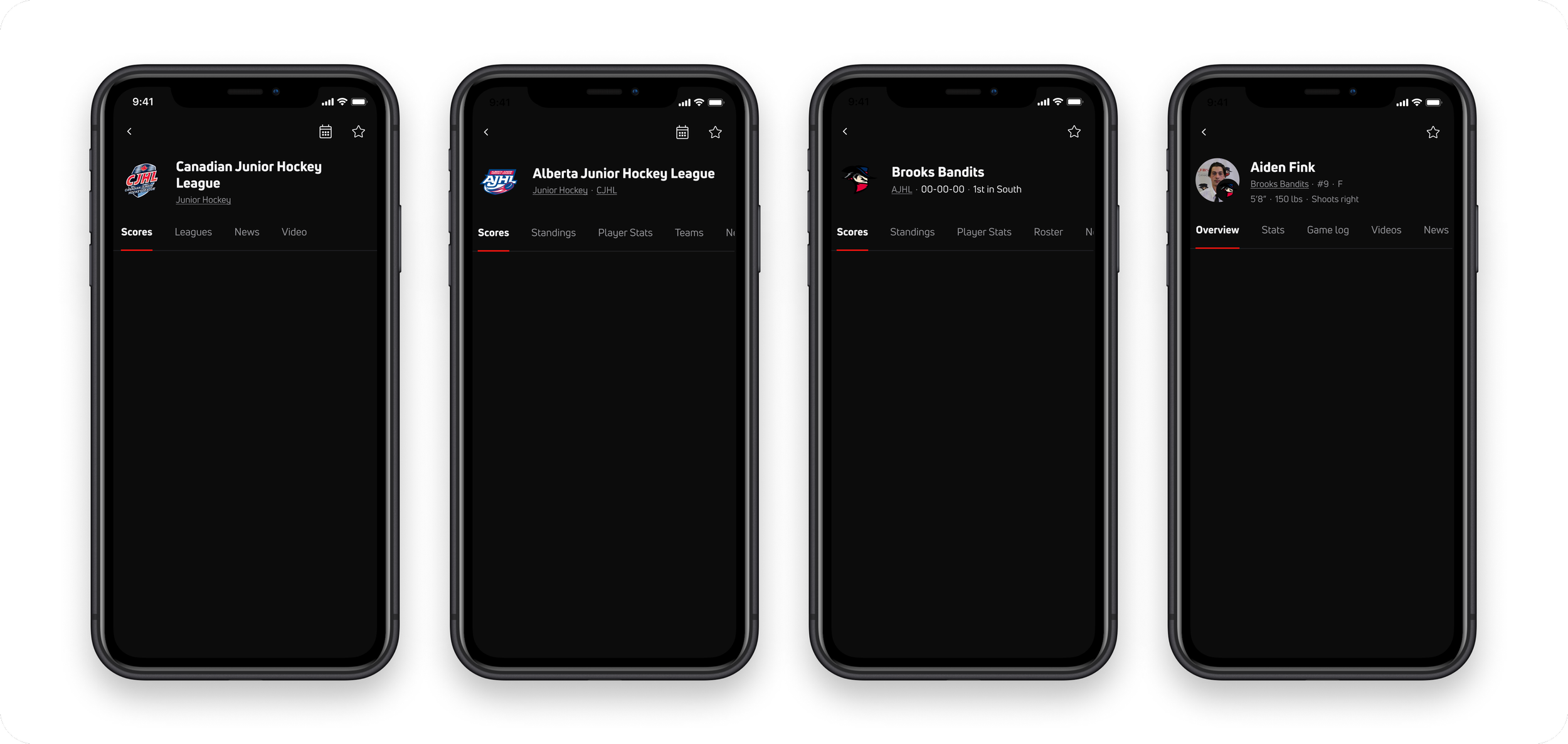
global overview
These pages were created for 5 responsive web breakpoints, accounting for our single column, and two-column page layout for the larger desktop viewports.
The scrolling behavior was also considered — when the user scrolls down the page, the header remains fixed at the top to allow for quick tab access, with a minimized height to prioritize the page content.
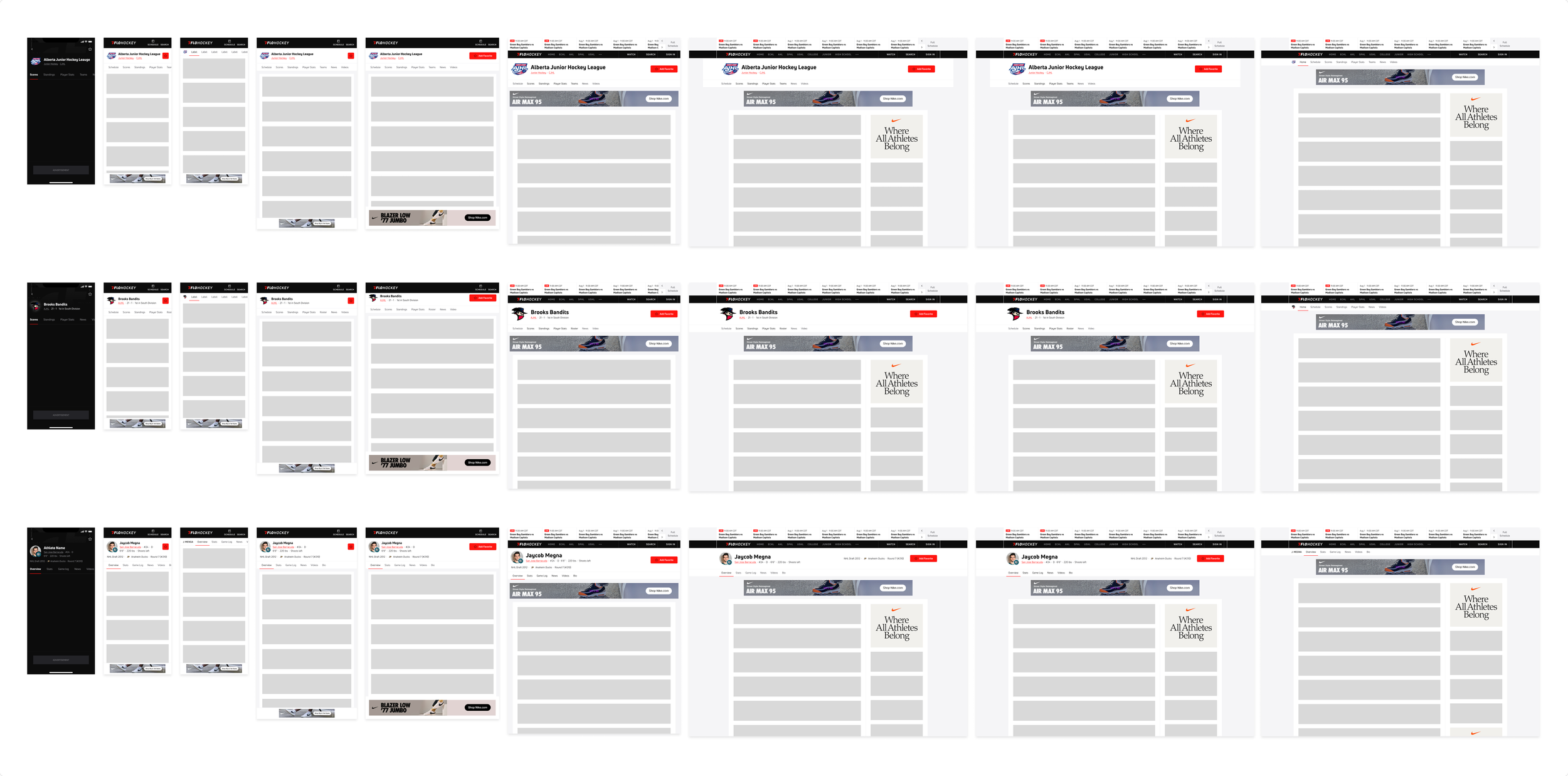
overview of all web breakpoints and native viewports
A closer look at these entity collection headers below outlines their responsive nature and consistent component elements (logo, title, breadcrumb parent entity links, favoriting CTA button).
Outcome
Once we established the architectural framework for these pages, we began to quickly incorporate these templates to other team sports that follow a similar navigational breakdown without the need to establish an entire new system from scratch.
It became a matter of updating naming conventions for new governing bodies, minor modification to components, and updated data sources using the framework already built in place.
These entity collection framework and templated patterns are currently evolving to become the foundation for other competitive, non team-based sports such as wrestling, grappling, track, racing, etc based on the established governing body connections. The release is planned for Fall 2023.
Global Prototype
Below is an interactive Figma prototype showcasing the architecture discussed in this project post, within the context of iOS designs.
You can navigate between the various entity relationships from the sidebar, as well as clicking within the prototype to immediately see the element connection between Leagues, Teams and Athlete Profiles.
Reference the Scores and Athlete Profiles project posts for an in-depth view of the design process.